Google Flow (Veo) Review 2026: The Most Realistic AI Video, With Sound
by Jordan · AI Video Desk — Jordan is a pen name used by a Zic Digital editor who runs the AI Video Desk. About us
Google Flow and the Gemini app make very realistic AI video with synced sound and native vertical output for Shorts; available from the AI Pro plan at about $19.99/month.
- Lifelike shots
- Built-in sound
- Vertical 9:16 for Shorts
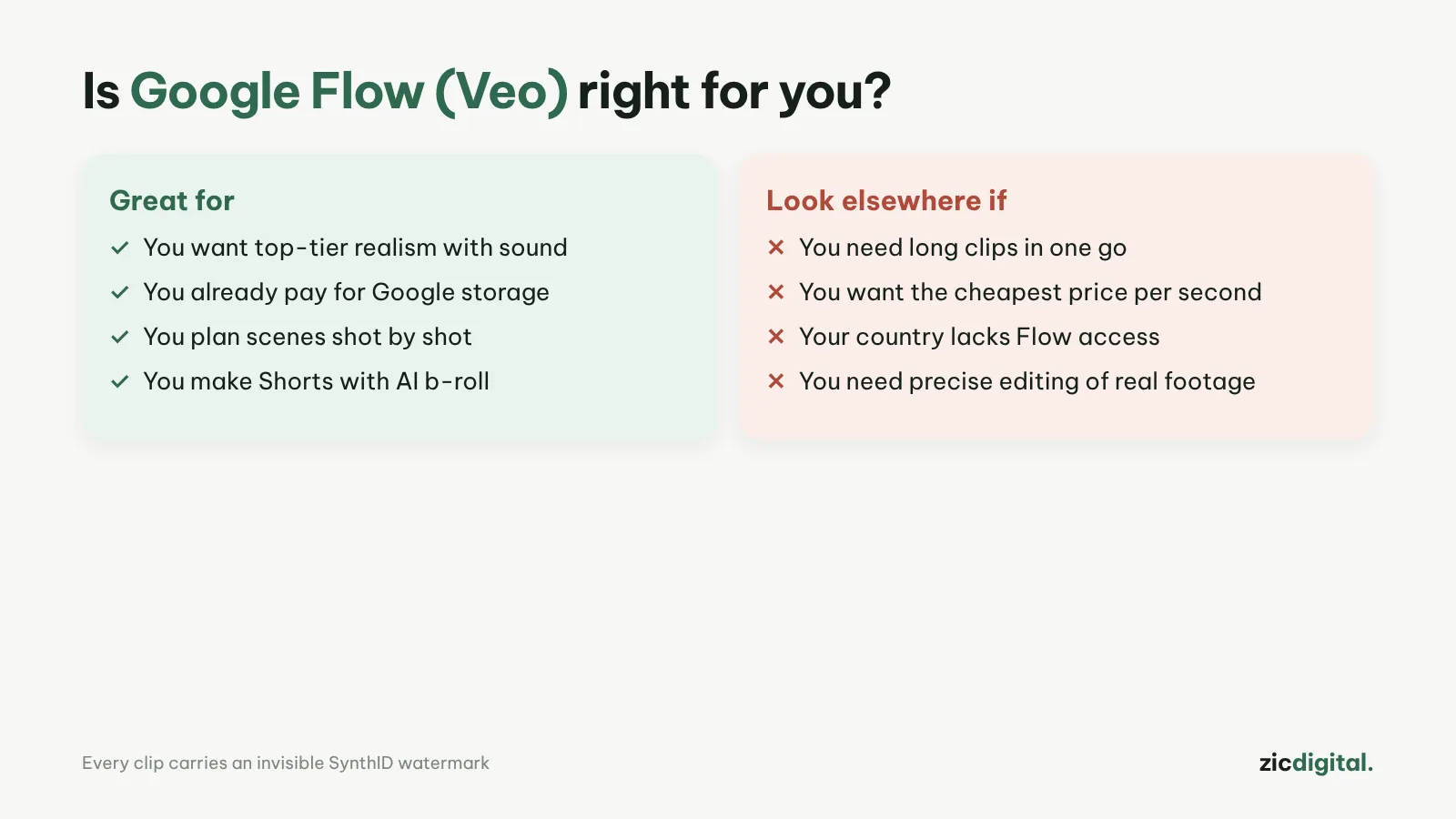
- You need realistic, cinematic shots
- You want clips with built-in sound and effects
- You already use Gemini or Google One
- You need more than about 10 seconds per generation
- You want frame-by-frame control
- You only want a long-term free option
Realistic visuals, synced audio, 9:16 output, AI Pro also includes Gemini and 5 TB storage
The in-app model keeps changing (Omni Flash replaced Veo), and each clip is only seconds long
Research-based review: official pricing pages, docs, the Artificial Analysis leaderboard and public user feedback, checked October 30, 2026
What Google Flow is
Flow is Google's AI filmmaking tool and works alongside the Gemini app. Since June 2026, Gemini Omni Flash has replaced Veo inside Gemini and Flow, while Veo 3.1 remains available through the Gemini API and Vertex AI for advanced users. Veo is known for very realistic visuals and synced audio (sound effects, dialogue) built into each clip.
Pricing
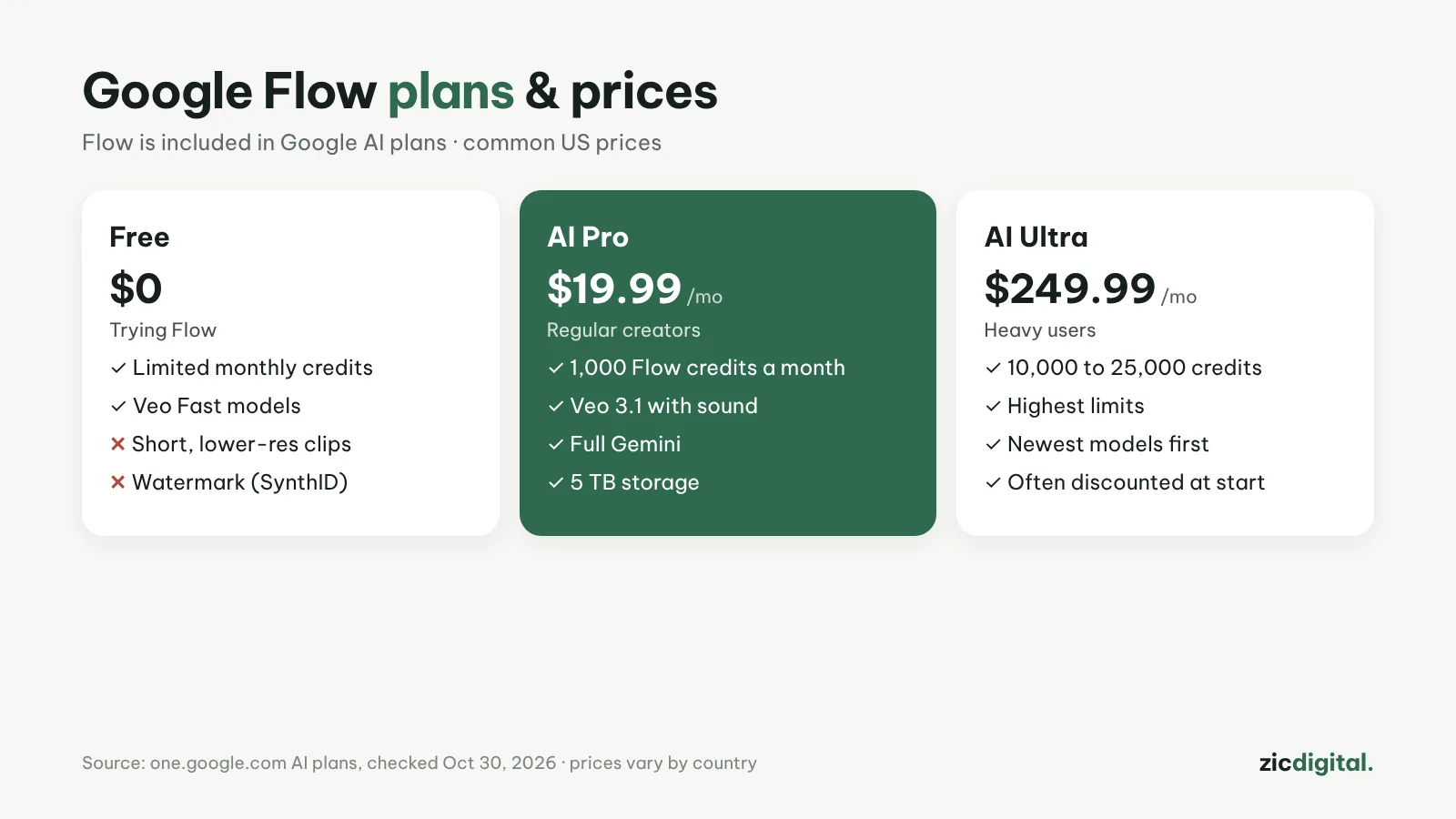
According to Google's AI plans page on October 30, 2026: AI Pro includes 1,000 Flow credits a month and AI Ultra 10,000–25,000. Common US prices are about $19.99/month for AI Pro and about $249.99/month for AI Ultra; AI Pro also includes full Gemini and 5 TB of storage. Omni Flash in Flow is limited to about 10 seconds at 720p per generation.
Downsides
Each clip is only a few seconds long, so longer videos mean stitching clips together. Google changes models and limits often, so check the plans page before you buy.
Key features
- Three ways to create a shot: write a prompt, set a start and end frame (Video > Frames), or add reference images or videos as "ingredients" (Video > Ingredients) to keep characters and settings consistent across clips.
- Custom voices: with the Omni Flash model you can add a voice reference or create your own voice when generating from ingredients.
- Cheap drafts: test ideas at 360p for fewer credits, then download the 720p version you like.
- 1080p or 4K export for your editing software (added in August 2026).
- Flow Agent: turn it on in the prompt box to generate several variations at once and keep the best.
Get started in 3 steps
- Open Flow and sign in with a Google account on an AI Pro or Ultra plan to get credits.
- Choose Video, set the aspect ratio (9:16 for Shorts, 16:9 for long videos) and the creation mode, then write your prompt following how to write AI video prompts.
- Generate 360p drafts, pick the one you like, download it in 1080p or 4K and finish it with exporting and upscaling AI video for YouTube.
How it compares
- vs Kling AI: Kling makes clips up to 30 seconds per generation; Flow stands out for realistic visuals and built-in sound — Google Flow vs Kling
- vs CapCut: CapCut lets you generate AI video inside the editor; Flow gives finer control over each shot — Google Flow vs CapCut
- vs Runway: Runway adds tools for editing existing footage — Runway review
- Replacing Sora: Sora has shut down; see Sora alternatives
Quick answers
How long is each clip? About 10 seconds; longer videos mean stitching clips, using start/end frames or ingredients to keep characters consistent.
Do videos get a watermark? Google adds an invisible SynthID watermark to AI-generated video; for commercial rights see free plans, watermarks and commercial use.
Can I use Flow clips on a monetized channel? Yes, if the video adds its own value (script, narration, editing) rather than mass-stitched AI clips — see can you monetize AI videos on YouTube.
Verdict
For the best-looking shots with sound built in, pick Google Flow. For 30-second clips and multi-shot storytelling, see Kling AI; for quick Shorts that follow your prompt, see Dreamina (Seedance). To assemble clips: YouTube Shorts in CapCut or DaVinci Resolve export settings for YouTube. AI-generated sound doesn't replace licensed background music: music for YouTube without copyright claims.
Compare: Google Flow (Veo) vs Kling AI 2026 · Google Flow vs CapCut 2026
All AI video tools: 10 Best AI Video Generators in 2026
See also: How to Write AI Video Prompts · Sora Is Gone
More about Google Flow (Veo)
- 10 Best AI Video Generators in 2026: Pick by What You Need
- Sora Is Gone: 6 Best Sora Alternatives in 2026
- How to Write AI Video Prompts: A Simple 5-Part Formula
- Can You Monetize AI Videos on YouTube? The 2026 Rules
- AI Video Free Plans, Watermarks and Commercial Use: 10 Tools Compared (2026)
- Google Flow (Veo) vs Kling AI 2026: Which AI Video Generator to Pick?
- Google Flow vs CapCut 2026: Make AI Video in Flow or Right Inside CapCut?