Hailuo AI (MiniMax) Review 2026: Dynamic Motion at a Fair Price
by Jordan · AI Video Desk — Jordan is a pen name used by a Zic Digital editor who runs the AI Video Desk. About us
MiniMax’s Hailuo AI runs H3 (top 3 on the text-to-video leaderboard) for 4–15 second clips up to 2K; there are trial credits, and Standard costs about $14.99/month.
- Lively, expressive motion
- Easy web app
- Clips up to 2K
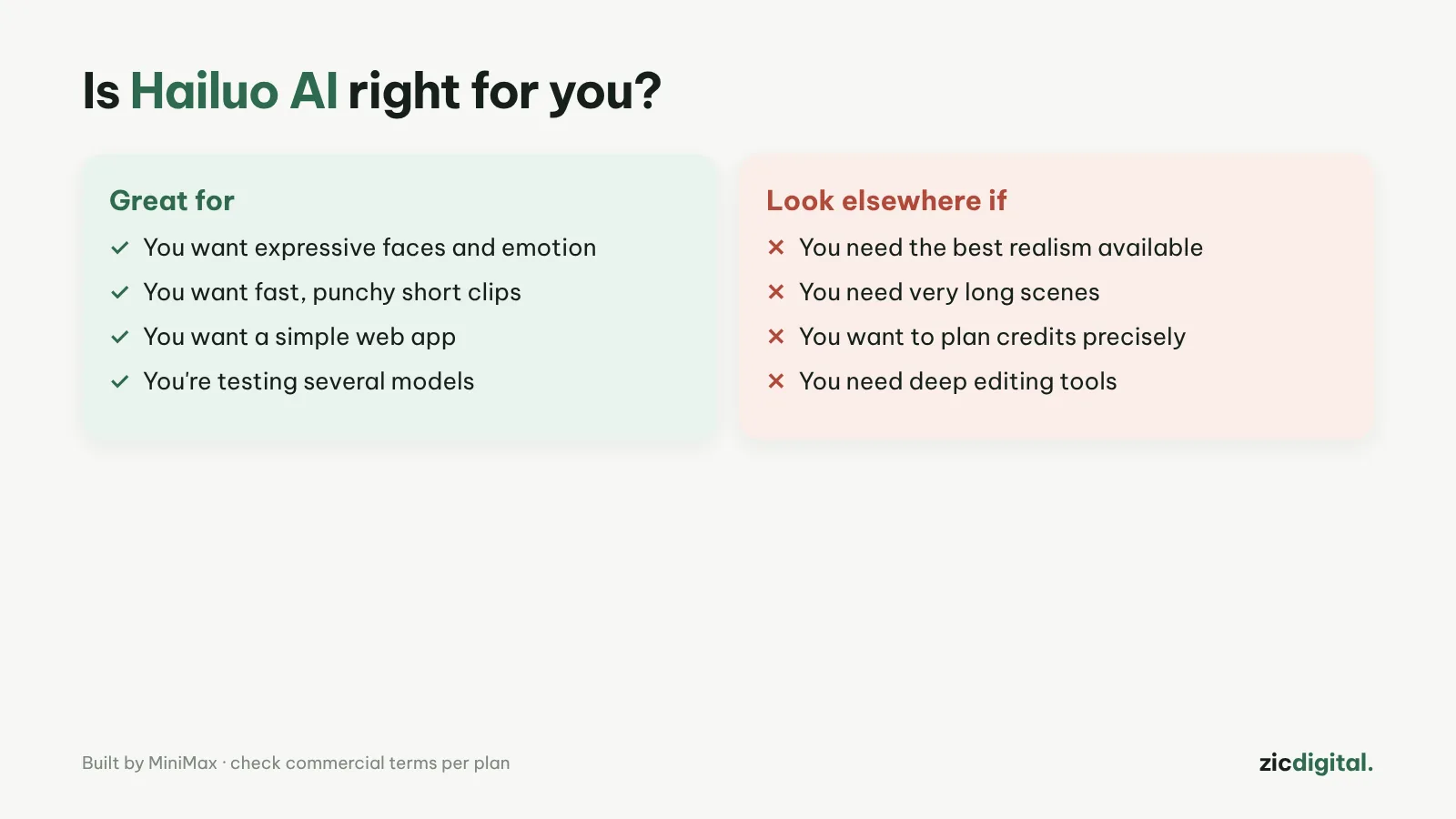
- You make action clips with fast motion
- You want an easy web interface
- You want a mid-range price
- You need more than 15 seconds per clip
- You need 4K
- You make lots of 2K clips every month
H3 is a top-3 model, lively motion, simple web interface
2K clips use many credits, 15-second maximum, no 4K
Research-based review: official pricing pages, docs, the Artificial Analysis leaderboard and public user feedback, checked October 30, 2026
What Hailuo AI is
Hailuo is the AI video app from MiniMax (China). Its newer MiniMax H3 model (July 2026) ranks in the top 3 on Artificial Analysis’s text-to-video leaderboard; Hailuo 2.3 is also available for faster, cheaper clips. H3 makes 4–15 second clips at 768p or 2K and stands out for lively motion.
Pricing
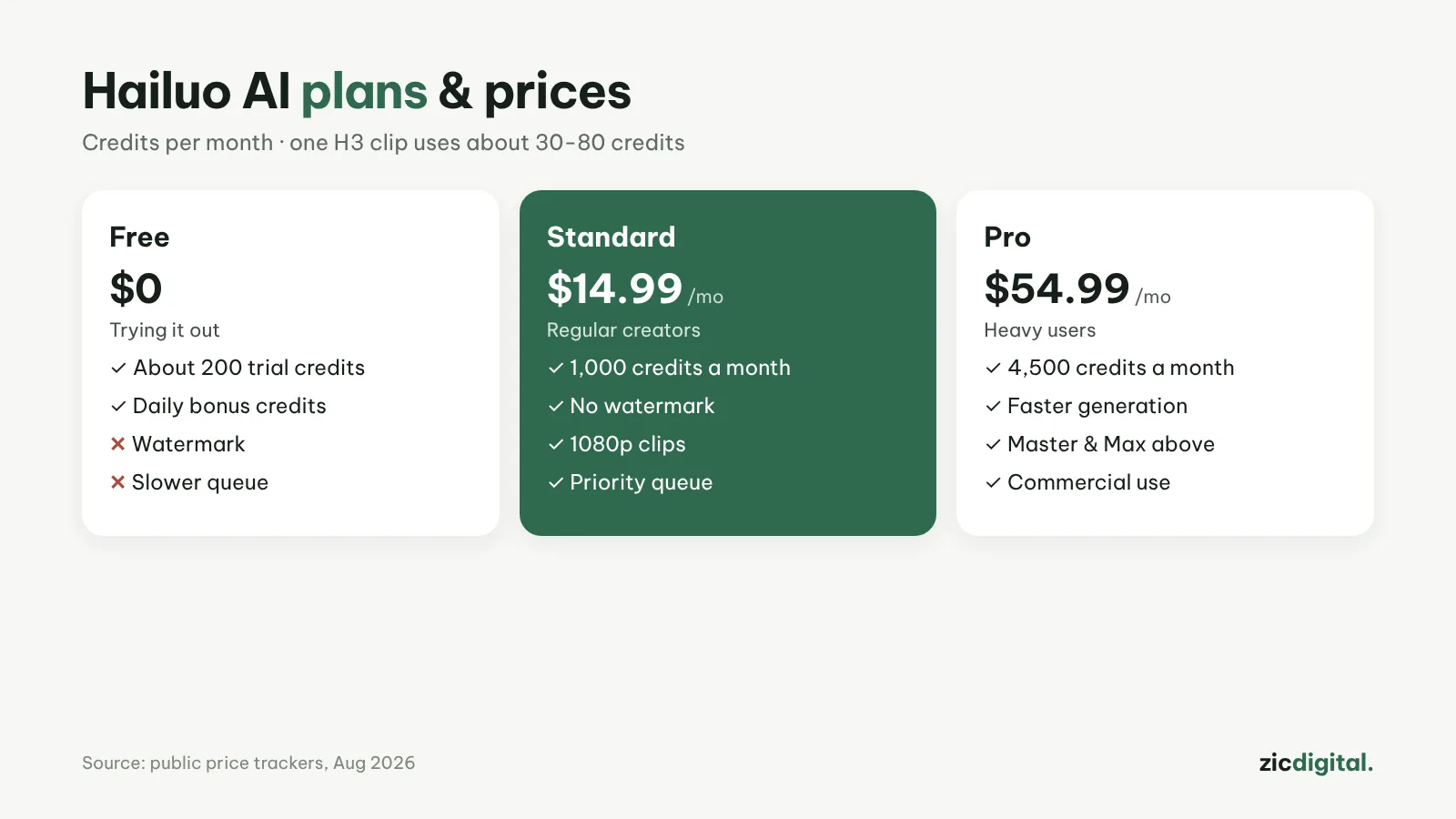
According to a price tracker (August 2026): about 200 trial credits, Standard $14.99/month (1,000 credits), Pro $54.99/month (4,500 credits), plus Master and Max for heavy users. One H3 clip uses roughly 30–80 credits depending on length and resolution.
Downsides
A 15-second 2K clip eats a lot of credits (one source estimates about 15% of a monthly plan). Hailuo doesn’t generate in 4K, and the free tier may add a watermark.
Key features
- Text or image to video: describe a scene, or upload a photo for Hailuo to animate.
- Omni Reference: upload one reference image of a character or object to keep the same face and outfit across clips.
- Hailuo Agent: an AI assistant that helps you plan and create videos from a request instead of writing every prompt yourself.
- Ready-made templates: many "photo to video" templates for quick fun clips, atmospheric shots or film-style scenes from one picture.
- Image generation in the same app: create a first frame in Hailuo, then turn it into video.
Get started in 3 steps
- Sign up at hailuoai.video, choose Create Video and the MiniMax H3 model.
- Write a prompt with a clear subject, action, camera angle and lighting following how to write AI video prompts; add a reference image if you need a consistent character.
- Test at 768p to save credits, then generate in 2K once you like it; download and finish with how to export and upscale AI video.
How it compares
- vs Wan: Wan charges per second and has open-source versions; Hailuo uses monthly credit plans — Wan vs Hailuo AI
- vs Kling: Kling makes clips up to 30 seconds in one go, better for longer stories — Kling AI review
- vs Runway: Runway adds tools for editing existing footage and 4K upscaling — Runway review
- The whole field: 10 best AI video generators in 2026
Quick answers
How do I make a video longer than 15 seconds? Generate several short clips in sequence with the same reference image so the character stays the same, then join them in CapCut or DaVinci Resolve.
Can I use Hailuo videos on a monetized channel? Yes if you use a paid plan and follow the terms; see commercial rights of AI video tools and YouTube monetization rules for AI video.
Why doesn't the clip match my idea? Usually the prompt is too vague. Describe one action at a time, state the camera angle and keep clips short.
Verdict
Hailuo suits short action clips at a fair price. For a lower per-second cost, see Wan (Alibaba); for 30-second clips, Kling AI. Export correctly with CapCut export settings for YouTube and TikTok; editing on a phone? See InShot vs Edits.
Compare: Wan vs Hailuo AI 2026
All AI video tools: 10 Best AI Video Generators in 2026
See also: How to Write AI Video Prompts
More about Hailuo AI
- 10 Best AI Video Generators in 2026: Pick by What You Need
- AI Video Free Plans, Watermarks and Commercial Use: 10 Tools Compared (2026)
- Wan vs Hailuo AI 2026: Which Budget AI Video Tool Is Better?