Kling AI Review 2026: Kling 4.0 Makes 30-Second, Multi-Shot Clips
by Jordan · AI Video Desk — Jordan is a pen name used by a Zic Digital editor who runs the AI Video Desk. About us
Kuaishou’s Kling AI is strong at human motion and multi-shot storytelling; Kling 4.0 (October 15, 2026) makes clips up to 30 seconds in one pass, with daily free credits and plans from about $8.80/month.
- 30-second clips
- Natural human motion
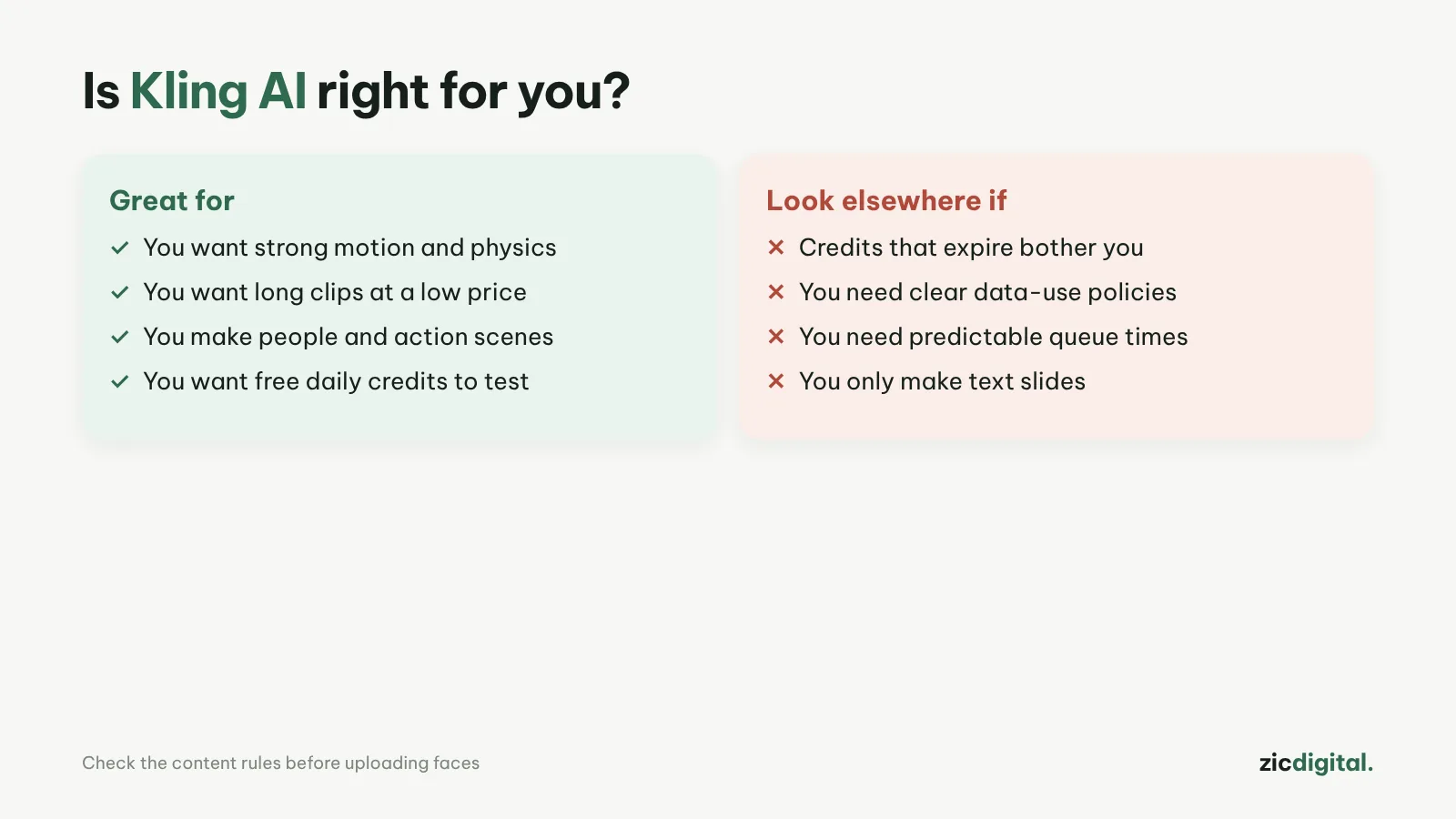
- Free credits every day
- You need longer clips with connected scenes
- You make videos with natural-moving characters
- You want lower prices than Runway or Google
- You need free exports without a watermark
- You handle sensitive client data
- You want the simplest possible interface
Clips up to 30 seconds, natural human motion, many reference images and keyframes
Free plan has a watermark and low resolution; monthly credits don’t roll over
Research-based review: official pricing pages, docs, the Artificial Analysis leaderboard and public user feedback, checked October 30, 2026
What Kling AI is
Kling is the AI video generator from Kuaishou (China). Kling 4.0 opened to all users on October 15, 2026: it makes clips up to 30 seconds in a single pass, accepts up to 15 reference images (Omni Reference) and 10 keyframes to steer the story. Kling is known for natural human motion.
Pricing
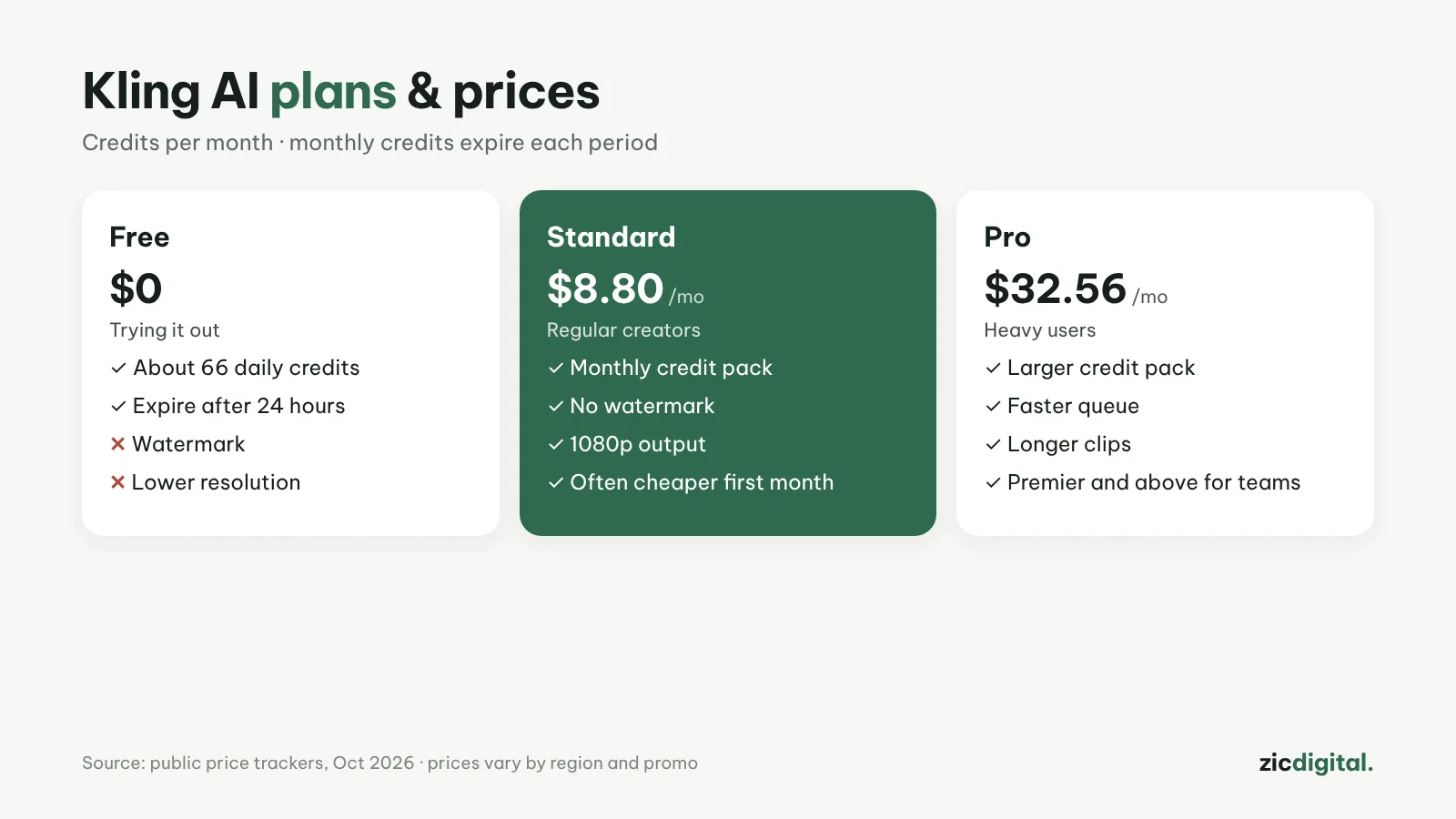
The free plan gives daily credits (about 66, expiring after 24 hours), with a watermark and low resolution. According to price trackers (October 2026): Standard is about $8.80/month and Pro about $32.56/month, often discounted for the first month. Monthly credits expire at the end of each billing period.
Downsides
The free plan’s watermark can’t be removed. Some 4K/HDR features are still listed as coming soon. For client work, read the data and usage terms carefully.
Key features
- Image to video: upload a start image and describe the motion; this keeps characters and framing steadier than text alone.
- Motion Control: copy the movement from a reference video onto your own character, handy for dances or moves that are hard to describe in words.
- Image generation in the same place: Kling Image 3.0 creates start frames, with a mode for a whole series of images in one style.
- Batch generation: run several generations at once and pick the best shot instead of waiting clip by clip.
- Web and mobile: the Creative Studio on kling.ai plus a mobile app; advanced users also get Kling MCP and a CLI.
Get started in 3 steps
- Sign in at kling.ai or in the Kling app to get your daily free credits.
- Choose Image to Video, upload a start image (or make one with Kling Image), then describe the motion and camera following how to write AI video prompts.
- Generate a few takes and download the one you like; the free plan adds a watermark, so channel-ready clips need a paid plan. Assemble and upscale with exporting AI video for YouTube.
How it compares
- vs Google Flow: Flow excels at realistic visuals with built-in sound; Kling gives longer clips per generation — Google Flow vs Kling
- vs Seedance (Dreamina): Seedance follows prompts closely and suits quick Shorts; Kling suits multi-shot storytelling — Kling vs Seedance
- vs Hailuo AI: Hailuo offers trial credits and a low entry price — Hailuo AI review
- The big picture: 10 best AI video generators 2026
Quick answers
What if I need more than 30 seconds? Stitch several clips, using reference images and keyframes to keep characters consistent. Kuaishou says video extension up to 2 minutes is in development.
Can I make videos for clients? You need a paid plan to remove the watermark, and you should read the usage terms carefully — see free plans, watermarks and commercial use.
Can a channel using Kling clips be monetized? Yes, if the video has its own script, narration and editing rather than mass-stitched AI clips — see can you monetize AI videos on YouTube.
Verdict
Kling suits creators who need longer clips and multi-shot stories at a fair price. For realistic shots with sound, see Google Flow (Veo); for quick Shorts that follow your prompt, Dreamina (Seedance). Add a voice with how to make an AI voiceover with ElevenLabs, then edit in CapCut.
Compare: Google Flow (Veo) vs Kling AI 2026 · Kling vs Seedance (Dreamina) 2026
All AI video tools: 10 Best AI Video Generators in 2026
See also: How to Write AI Video Prompts · Sora Is Gone
More about Kling AI
- 10 Best AI Video Generators in 2026: Pick by What You Need
- Sora Is Gone: 6 Best Sora Alternatives in 2026
- How to Make Faceless YouTube Shorts with AI (2026)
- How to Write AI Video Prompts: A Simple 5-Part Formula
- AI Video Free Plans, Watermarks and Commercial Use: 10 Tools Compared (2026)
- Google Flow (Veo) vs Kling AI 2026: Which AI Video Generator to Pick?
- Kling vs Seedance (Dreamina) 2026: Which AI Video Model Fits You?