Google Flow (Veo) vs Kling AI 2026: Which AI Video Generator to Pick?
by Jordan · AI Video Desk — Jordan is a pen name used by a Zic Digital editor who runs the AI Video Desk. About us
Google Flow gives realistic shots with synced sound and comes with Google AI Pro; Kling AI makes clips up to 30 seconds with natural human motion for less. Compare clip length, control, pricing and who each suits.
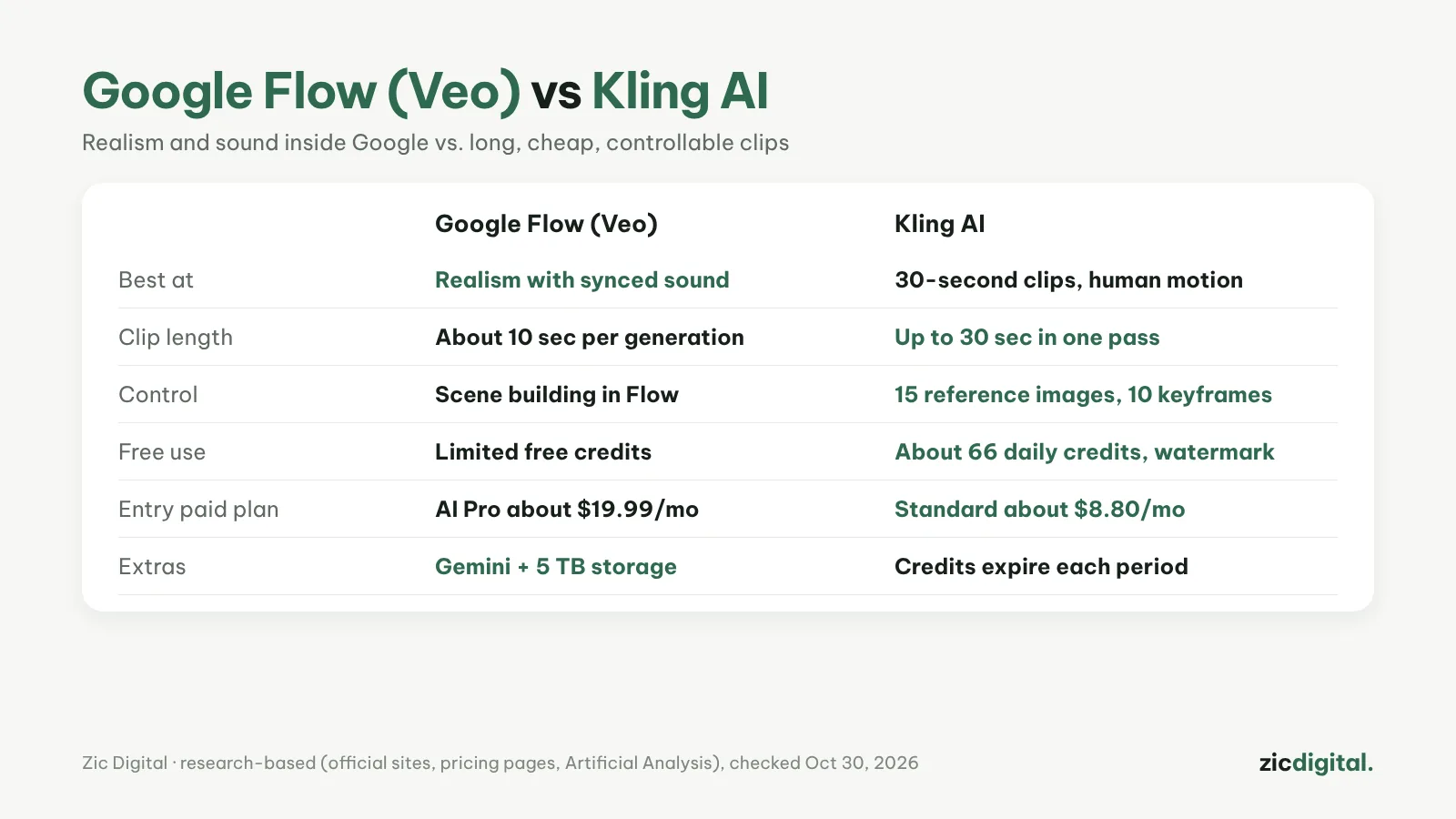
These are the two names that come up most for AI footage in Shorts. Google Flow leads on realism and sound built into each clip; Kling AI leads on long clips, human motion and a low entry price.
Choose Google Flow (Veo) if
- You need the most realistic shots with sound effects and dialogue
- You already pay for Google storage (AI Pro includes 5 TB and Gemini)
- You build scenes shot by shot in Flow
Choose Kling AI if
- You need clips up to 30 seconds in one pass (Kling 4.0)
- You want to steer the story with 15 reference images and 10 keyframes
- You want a cheap plan (Standard about $8.80/month) and daily free credits
Cost
Google AI Pro is about $19.99/month (US) with 1,000 Flow credits, Gemini and 5 TB of storage; each Flow generation is about 10 seconds at 720p. Kling: about 66 free credits a day (watermarked), Standard about $8.80/month, Pro about $32.56/month; monthly credits expire at the end of each period.
Quick comparison
- Model: since June 2026, Flow runs Gemini Omni Flash in place of Veo; Veo 3.1 stays available through the Gemini API and Vertex AI. Kling runs Kling 4.0, open to all users since October 15, 2026.
- Clip length: Flow makes about 10 seconds per generation; Kling up to 30 seconds in one pass.
- Sound: Flow builds synced sound effects and dialogue into each clip, and Omni Flash can use a voice reference.
- Consistency: Flow uses start and end frames or "ingredients" (reference images or videos); Kling uses up to 15 reference images and 10 keyframes.
- Resolution: Flow generates at 720p and exports 1080p or 4K. Kling's free plan is low resolution with a watermark.
- Free use: Kling gives about 66 credits a day. Flow credits come with a Google AI Pro or Ultra plan.
- Watermark: Google adds an invisible SynthID watermark; Kling's free plan adds a visible one.
Which one for which video
- Realistic B-roll with natural sound: Flow.
- One continuous 20–30 second scene: Kling, since Flow would need several clips stitched together.
- Dance or action moves: Kling — Motion Control copies movement from a reference video.
- A short film built shot by shot: Flow — start/end frames and ingredients link the shots.
- Testing many ideas cheaply: Flow drafts at 360p for fewer credits; Kling runs several generations at once.
- You already pay for Google storage: Flow comes inside AI Pro, together with Gemini and 5 TB.
Quick answers
Is it still Veo inside Flow? Inside Flow and the Gemini app, Gemini Omni Flash replaced Veo in June 2026. Veo 3.1 is still available through the Gemini API and Vertex AI.
How do I make a 60-second video? Stitch clips — about six from Flow or two from Kling — keeping characters consistent with frames, ingredients or reference images, then assemble and upscale with exporting AI video for YouTube.
Can I use these clips on a monetized channel? Yes, if the video has its own script, narration and editing rather than mass-stitched AI clips — see can you monetize AI videos on YouTube.
Verdict
Want cinematic shots with sound and already live in Google’s ecosystem: Google Flow. Need long, multi-shot storytelling on a budget: Kling AI. Many creators use both: Flow for hero shots, Kling for longer scenes.
Comparison based on official sites, pricing pages, the Artificial Analysis leaderboard and comparison sites, checked October 30, 2026 — no affiliate links.
Read more: Google Flow (Veo) review · Kling AI review · Wan vs Hailuo AI 2026 · Google Flow vs CapCut 2026 · How to Make YouTube Shorts in CapCut, Step by Step
All AI video tools: 10 Best AI Video Generators in 2026
Keep reading
- 10 Best AI Video Generators in 2026: Pick by What You Need
- Sora Is Gone: 6 Best Sora Alternatives in 2026
- How to Write AI Video Prompts: A Simple 5-Part Formula
- AI Video Free Plans, Watermarks and Commercial Use: 10 Tools Compared (2026)
- How to Make Faceless YouTube Shorts with AI (2026)
- Can You Monetize AI Videos on YouTube? The 2026 Rules