Dreamina (Seedance 2.5) Review 2026: AI Video That Follows Your Prompt, From CapCut’s Maker
by Jordan · AI Video Desk — Jordan is a pen name used by a Zic Digital editor who runs the AI Video Desk. About us
Dreamina is the AI platform from CapCut’s parent company, running Seedance 2.5, which follows prompts very well and makes clips up to 30 seconds with audio; daily free credits, yearly plans from about $14/month.
- Follows your prompt closely
- 30-second clips with sound
- Seedance is also in CapCut
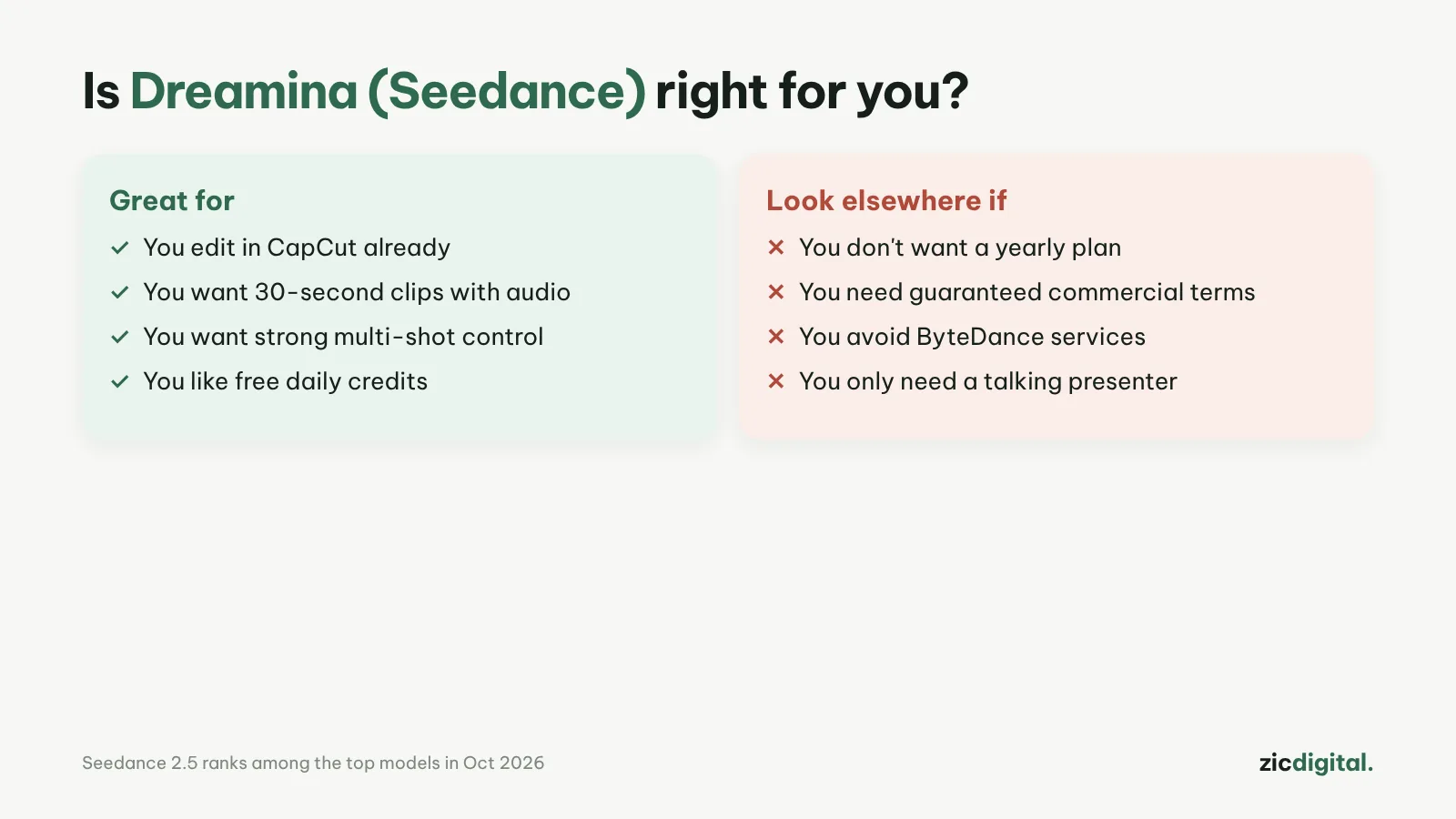
- You make Shorts or Reels and want video that matches your prompt
- You already know CapCut
- You want clips with built-in sound
- You want monthly rather than yearly billing
- You make client ads without clear commercial rights
- You need 4K
Seedance 2.5 follows prompts well, 30-second clips with audio, daily free credits
Paid plans are mostly yearly; commercial use depends on Dreamina’s terms
Research-based review: official pricing pages, docs, the Artificial Analysis leaderboard and public user feedback, checked October 30, 2026
What Dreamina is
Dreamina is ByteDance’s AI image and video platform. It runs on dreamina.capcut.com and shares CapCut’s terms. Its main video model is Seedance 2.5 (released July 31, 2026), which comparisons rate as the best at following prompts, with clips up to 30 seconds including audio.
Pricing
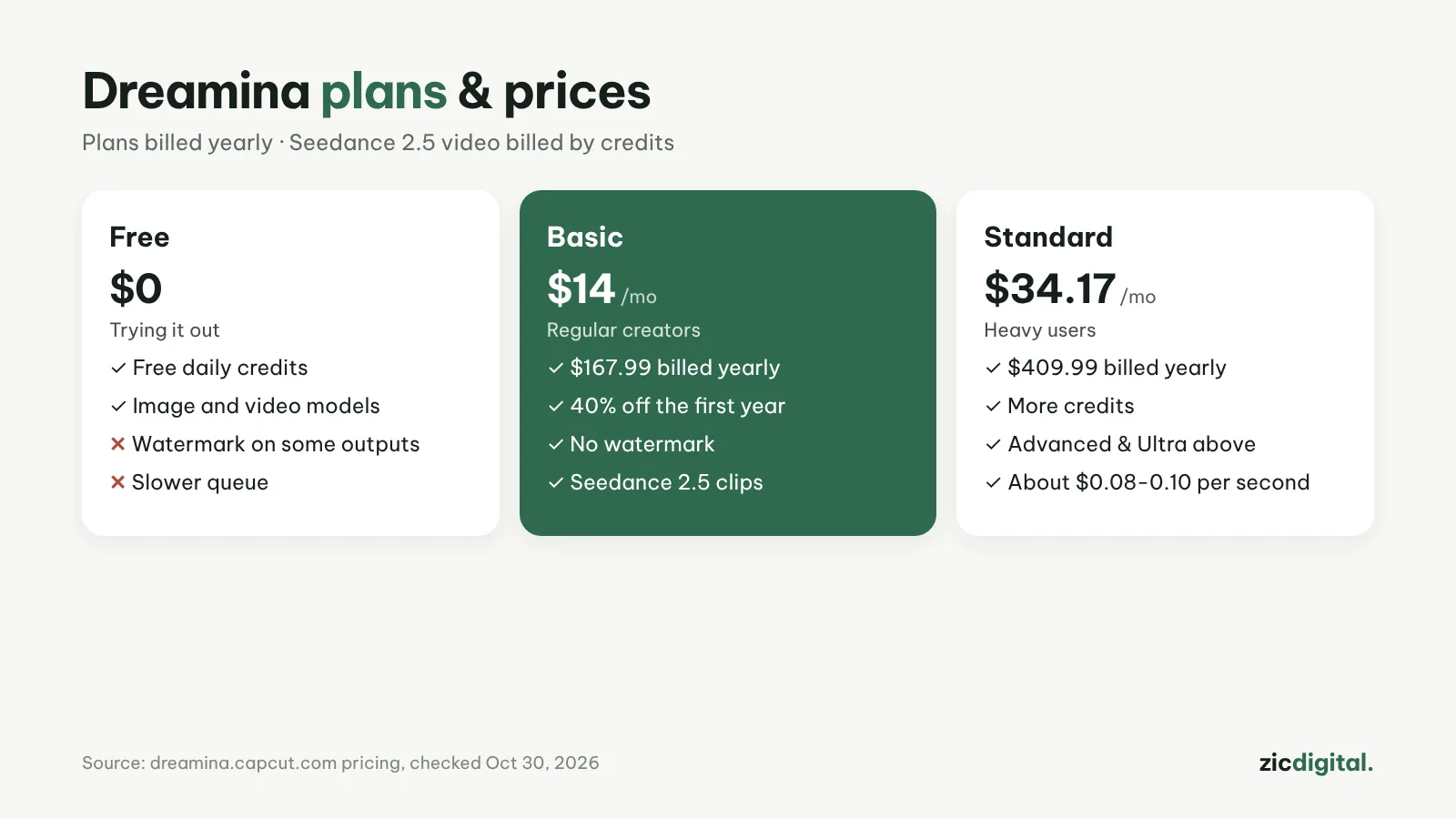
Dreamina gives free daily credits (about 120 as of August 2026, depending on the account). According to the pricing page on October 30, 2026, plans are billed yearly: Basic $167.99/year (about $14/month, 40% off the first year), Standard $409.99/year, plus Advanced and Ultra for heavy users. Seedance 2.5 video costs roughly $0.08–0.10 per second depending on the plan.
Downsides
Paid plans are mostly yearly. Dreamina says commercial use “depends on the applicable terms,” so read them before making ads.
Key features
- Multiple reference images: Seedance 2.5 accepts up to 4 images at once to keep the same character, product or vehicle throughout a clip.
- Reference video: give Dreamina a sample video and it copies the framing, pacing and camera movement — handy for trends.
- Lip sync and talking avatars: match lips to an audio file you supply, or create a talking avatar from a photo and text.
- Seedance 2.0 Mini: a cheaper model in credits, good for testing ideas before making the final version with Seedance 2.5.
- Images and edits in one place: generate images with Seedream 5.0, swap backgrounds and upscale photos; for video there is green-screen replacement and Sound Edit (removes background music and adds narration).
Get started in 3 steps
- Sign in at dreamina.capcut.com and collect your free daily credits.
- Write a prompt following how to write AI video prompts, test it with Seedance 2.0 Mini, then make the final with Seedance 2.5, adding reference images to keep a character consistent.
- Download the clip, edit and caption it in CapCut, and export following how to export and upscale AI video for YouTube.
How it compares
- vs Kling AI: Kling is strong at human motion and multi-shot storytelling; Seedance follows prompts more closely — Kling vs Seedance
- vs Google Flow (Veo): Veo is known for realistic footage with audio included — Google Flow vs CapCut
- vs Runway: Runway fits when you need to edit existing footage with Aleph 2.0 — Runway review
- vs Wan: Wan is priced per second and older versions are open source, good if you want to run it yourself — Wan review
Quick answers
How are Dreamina and CapCut related? Both belong to ByteDance and share the same terms. Seedance is also built into CapCut (Pro uses Seedance 2.0 Mini), so if you already pay for CapCut Pro, try it there first — see CapCut pricing 2026.
Can Dreamina videos be monetized on YouTube? Yes, if the video adds its own value and you label realistic AI scenes; commercial rights and watermarks differ by plan — see can you monetize AI videos and free plans, watermarks and commercial use.
Does it work on a phone? Dreamina runs in the browser, so it opens on phones too; to keep editing on your phone, use CapCut.
Verdict
Dreamina suits Shorts creators who want video that matches the prompt and already know the CapCut ecosystem. Compare with Kling AI (long clips, storytelling) and Google Flow (Veo) (most realistic). Finish in CapCut; if you use lots of AI inside CapCut, see CapCut Free, Pro and Ultra pricing and YouTube Shorts in CapCut.
Compare: Kling vs Seedance (Dreamina) 2026
All AI video tools: 10 Best AI Video Generators in 2026
See also: How to Write AI Video Prompts · Sora Is Gone
More about Dreamina (Seedance)
- 10 Best AI Video Generators in 2026: Pick by What You Need
- Sora Is Gone: 6 Best Sora Alternatives in 2026
- How to Write AI Video Prompts: A Simple 5-Part Formula
- AI Video Free Plans, Watermarks and Commercial Use: 10 Tools Compared (2026)
- Kling vs Seedance (Dreamina) 2026: Which AI Video Model Fits You?