Runway vs Luma Dream Machine 2026: Which AI Video Platform Is Worth It?
by Jordan · AI Video Desk — Jordan is a pen name used by a Zic Digital editor who runs the AI Video Desk. About us
Runway is strongest at editing existing video with AI (Aleph 2.0), with a free trial and plans from $15/month; Luma bundles many models (Ray3, Seedance, Kling, Veo 3.1) plus Luma Agents, from $30/month.
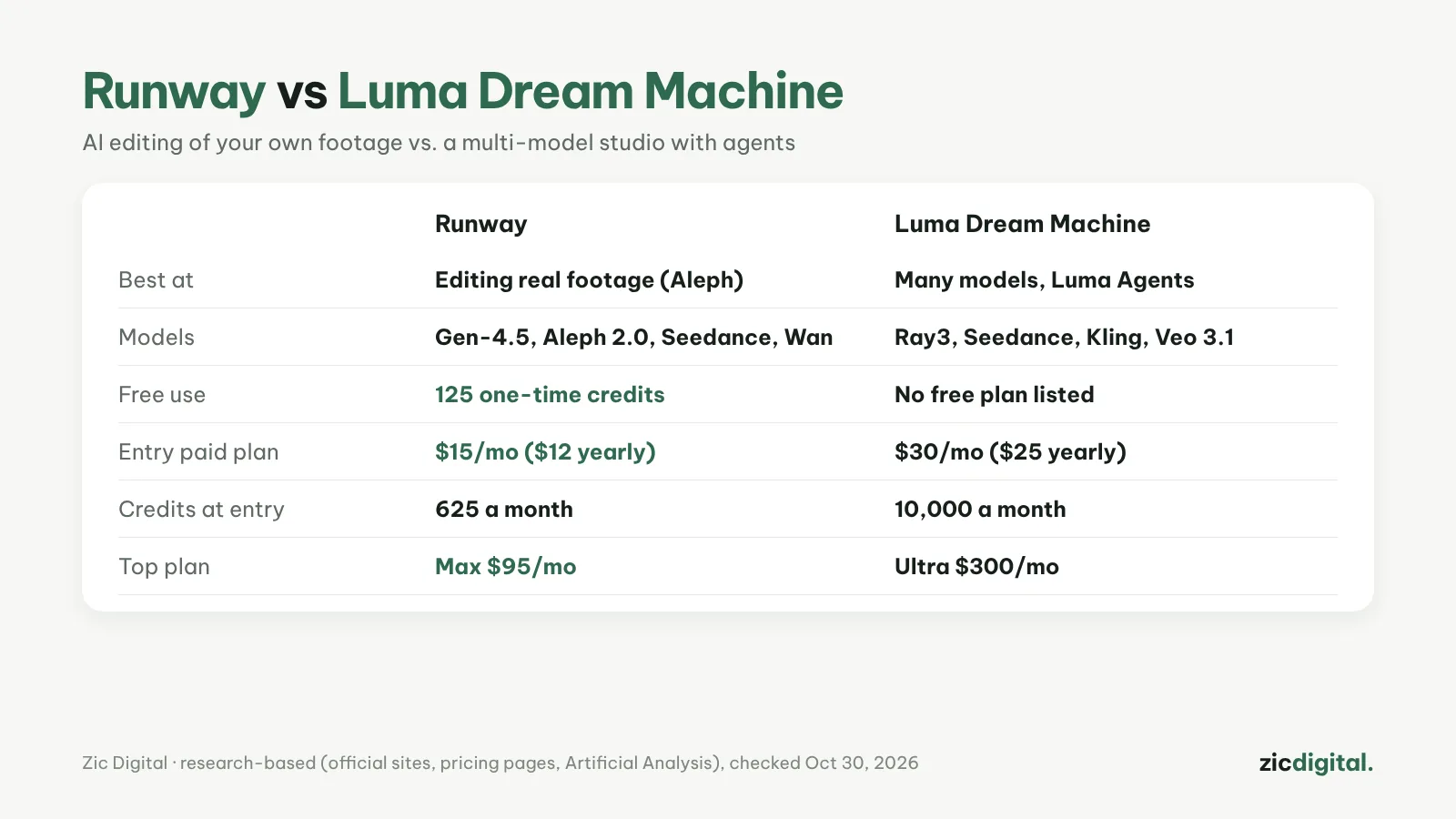
Runway and Luma are both AI video “studios” for serious creators, and both sell access to several models in one place. The biggest difference: Runway is strongest at editing footage you already shot, Luma at testing many models and automating work.
Choose Runway if
- You want to edit real footage with words (change the setting, add or remove objects with Aleph 2.0)
- You want to try it free first (125 credits)
- You want a low entry price (Standard $15/month)
Choose Luma Dream Machine if
- You want Veo 3.1, Kling, Seedance and Ray3 in one place
- You want Luma Agents to automate your workflow
- You need lots of credits (Plus has 10,000 a month, with commercial use)
Cost
Runway: Free gives 125 one-time credits; Standard $15/month ($12 billed yearly, 625 credits, no watermark); Pro $35; Max $95. Gen-4.5 uses 60 credits per 5 seconds, so Standard covers only about 10 clips. Luma: Plus $30/month ($25 yearly, 10,000 credits), Pro $90, Ultra $300; no free plan on the pricing page.
Quick comparison
- Free start: Runway gives 125 one-time credits; Luma's pricing page lists no free plan, so you start on Plus.
- Credits: Runway Standard is $15 for 625 credits; Luma Plus is $30 for 10,000 credits. The numbers aren't comparable one to one, because each platform and each model charges a different amount per clip.
- Models: Runway has Gen-4.5, Aleph 2.0 for editing, and resells Seedance and Wan. Luma has its own Ray3 models plus Seedance, Kling, Veo 3.1, MiniMax and Flux.
- Editing existing video: Aleph 2.0 is Runway's model for changing settings and adding or removing objects. Luma can modify existing video with words through Seedance 2.5 and reframe clips from 16:9 to 9:16.
- Automation: Runway Workflows save a chain of steps you can reuse; Luma Agents automate work across the platform.
- Audio: Luma includes ElevenLabs voices, sound effects, music and lip-sync tools; Runway Pro adds one voice clone and a Brand Kit.
Which one for which video
- Ads and music videos built on real footage: Runway, for Aleph 2.0 and Act-Two, which lets you act out a character's performance yourself.
- Storyboards and testing one idea on several models: Luma — compare Ray3.2, Kling 4.0, Seedance 2.5 and Veo 3.1 in one account.
- Smooth transitions between two images: Luma's keyframes let Ray3.2 fill in the motion between a start and an end frame.
- A few AI shots a month: Runway Standard is the cheaper entry; see what it buys in Runway pricing 2026.
- Vertical Shorts from horizontal clips: Luma's Reframe turns 16:9 into 9:16; then follow how to export and upscale AI video.
Quick answers
Can I try Luma for free? The pricing page lists no free plan. To try AI video at $0 first, see the free options in AI video free plans and watermarks.
Can Luma edit footage I already shot? Yes: Modify edits existing video with words using Seedance 2.5. Runway's Aleph 2.0 does the same job and also lets you add or remove objects.
Can videos from either one be monetized on YouTube? Paid plans give clean files, but YouTube still checks whether the video adds its own value and asks you to label realistic AI scenes — see can you monetize AI videos on YouTube.
Verdict
Making ads or music videos and need to edit existing footage: Runway. Want to test many top models in one account with a bigger budget: Luma. Beginners should start with Runway’s free trial.
Comparison based on official sites, pricing pages, the Artificial Analysis leaderboard and comparison sites, checked October 30, 2026 — no affiliate links.
Read more: Runway review · Luma Dream Machine review · Adobe Firefly vs Runway 2026 · Artlist review
All AI video tools: 10 Best AI Video Generators in 2026
See also: Runway Pricing 2026: Free, Standard, Pro or Max — Which Plan Is Enough?
Keep reading
- 10 Best AI Video Generators in 2026: Pick by What You Need
- Sora Is Gone: 6 Best Sora Alternatives in 2026
- AI Video Free Plans, Watermarks and Commercial Use: 10 Tools Compared (2026)
- Runway Pricing 2026: Free, Standard, Pro or Max — Which Plan Is Enough?
- How to Export and Upscale AI Video Clips for YouTube
- Adobe Firefly vs Runway 2026: Which AI Video Tool for Brand Work?