Adobe Firefly vs Runway 2026: Which AI Video Tool for Brand Work?
by Jordan · AI Video Desk — Jordan is a pen name used by a Zic Digital editor who runs the AI Video Desk. About us
Adobe Firefly has a video model Adobe says is safe for commercial use, connects to Premiere and starts at $9.99/month; Runway offers more creative control and editing of existing footage, from $15/month.
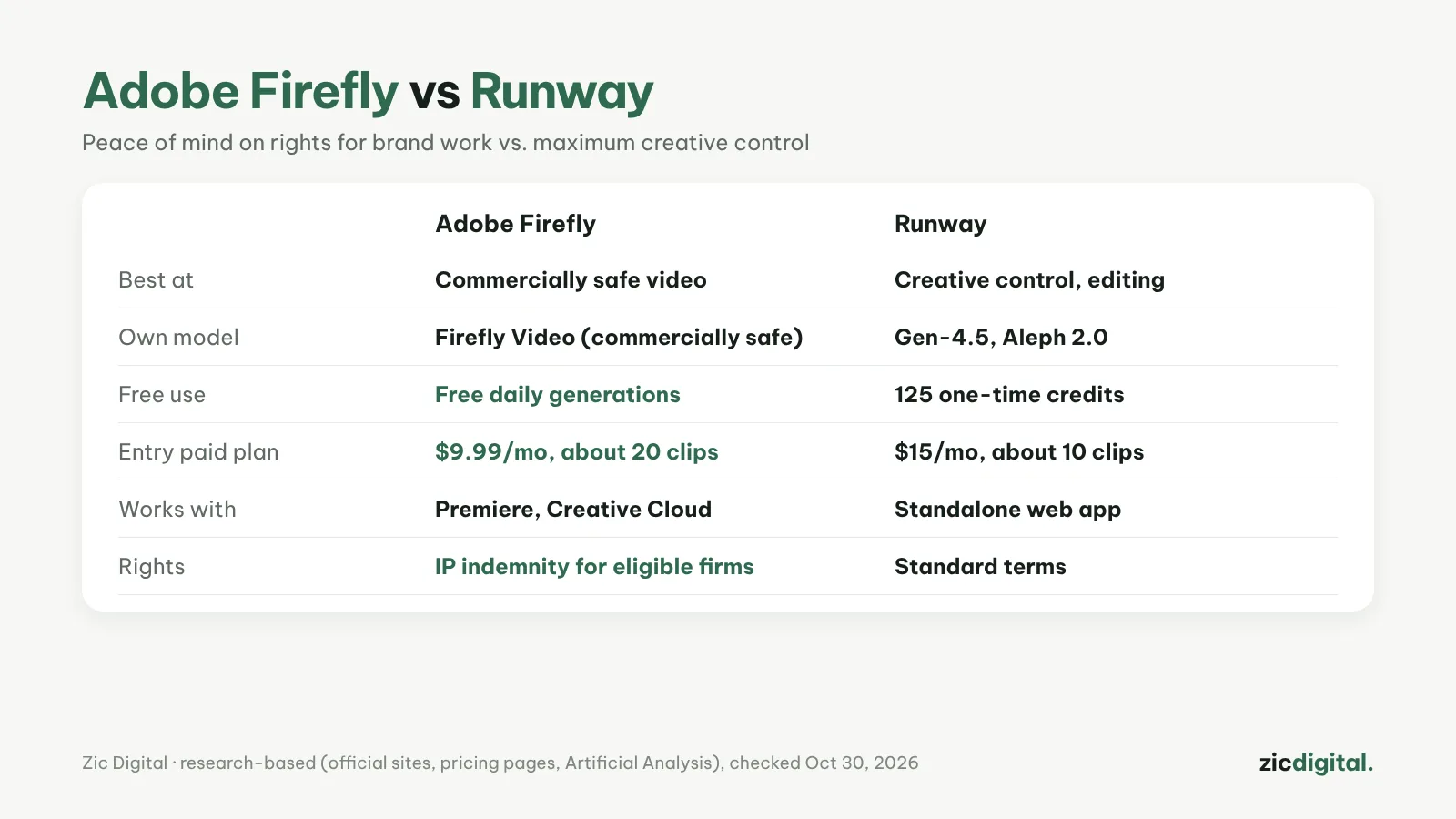
If you make videos for clients or brands, the question isn’t just “which looks better” but also “can I use it with peace of mind”. Firefly and Runway answer that differently.
Choose Adobe Firefly if
- You make videos for brands or clients and need peace of mind on rights
- You already use Premiere or Creative Cloud
- You want a low entry price and free daily generations
Choose Runway if
- You need maximum creative control (music videos, ads, short films)
- You want to edit real footage with words using Aleph 2.0
- You want to try several models (Gen-4.5, Seedance, Wan) in one place
Cost
Firefly: free daily generations; Standard $9.99/month (2,000 credits, up to 20 five-second videos); Pro $19.99 (40 videos); Premium $199.99 (unlimited with the Firefly Video Model). Runway: 125 trial credits; Standard $15/month (625 credits, about 10 Gen-4.5 clips); Pro $35; Max $95.
Quick comparison
- Rights: Adobe says output from Firefly's own models is safe for commercial use, and eligible enterprise customers can get IP indemnification. Partner models inside Firefly aren't covered by that promise. Runway's paid plans remove the watermark; read its terms before client work.
- Editing footage you already shot: Runway's Aleph 2.0 changes the setting or adds and removes objects in real video. Firefly's editor regenerates or extends segments of AI clips and adds voiceover, music and sound effects.
- Models: Firefly has its own Firefly Video model plus partner models (Google, OpenAI, Flux and more). Runway has Gen-4.5 and also resells Seedance and Wan.
- Clips and export: Firefly downloads MP4 up to 4K; most models make clips up to 8 seconds, some up to 15. Runway offers 4K upscaling from Standard, unlimited on Pro.
- Free start: Firefly has free daily generations; Runway gives 125 one-time credits.
- Labels: Adobe attaches Content Credentials instead of a visible watermark; Runway's free plan adds a visible watermark.
Which one for which video
- An ad or product video for a client: Firefly with the Firefly Video model, so the rights question has a clear answer.
- A music video or short film built on real footage: Runway — Aleph 2.0 edits the shots you filmed, and Act-Two lets you act out a character's performance yourself.
- AI shots inside a Premiere project: Firefly, since it connects to Premiere and Creative Cloud.
- The same steps for every video (image → video → upscale): Runway Workflows save the chain so you can reuse it.
- A YouTube channel on a small budget: compare what the entry plans buy. Firefly Standard covers up to 20 five-second videos a month; Runway Standard about ten 5-second Gen-4.5 clips. Details: Runway pricing 2026.
Quick answers
Can I use Firefly's partner models for client work? You can, but Adobe's commercial-safety commitment covers only Firefly's own models; with partner models you are responsible for the content. More: commercial rights of AI video tools.
Do Runway credits roll over? Not on Standard or Pro; Max rolls unused credits over for up to one month. Top-up credits (minimum 1,000) never expire.
Do I have to label these videos on YouTube? If they show realistic AI-generated scenes, yes — see can you monetize AI videos on YouTube.
Verdict
Client work, rights peace of mind and you know Adobe: Firefly. Bold creative work and editing existing footage: Runway. Note that partner models inside Firefly (Google, OpenAI and others) aren’t covered by Adobe the way Firefly models are.
Comparison based on official sites, pricing pages, the Artificial Analysis leaderboard and comparison sites, checked October 30, 2026 — no affiliate links.
Read more: Adobe Firefly review · Runway review · Runway vs Luma Dream Machine 2026 · Adobe Premiere (mobile) review · Is CapCut Safe? Privacy and Terms Every Creator Should Know
All AI video tools: 10 Best AI Video Generators in 2026
See also: Runway Pricing 2026: Free, Standard, Pro or Max — Which Plan Is Enough?
Keep reading
- 10 Best AI Video Generators in 2026: Pick by What You Need
- AI Video Free Plans, Watermarks and Commercial Use: 10 Tools Compared (2026)
- Runway Pricing 2026: Free, Standard, Pro or Max — Which Plan Is Enough?
- Sora Is Gone: 6 Best Sora Alternatives in 2026
- How to Export and Upscale AI Video Clips for YouTube
- Runway vs Luma Dream Machine 2026: Which AI Video Platform Is Worth It?