CapCut vs Filmora 2026: Which Desktop Editor Should You Use?
CapCut is monthly, and its free plan exports 1080p mostly without a watermark; Filmora is yearly or one-time with a huge effects library, but its free version adds a watermark.
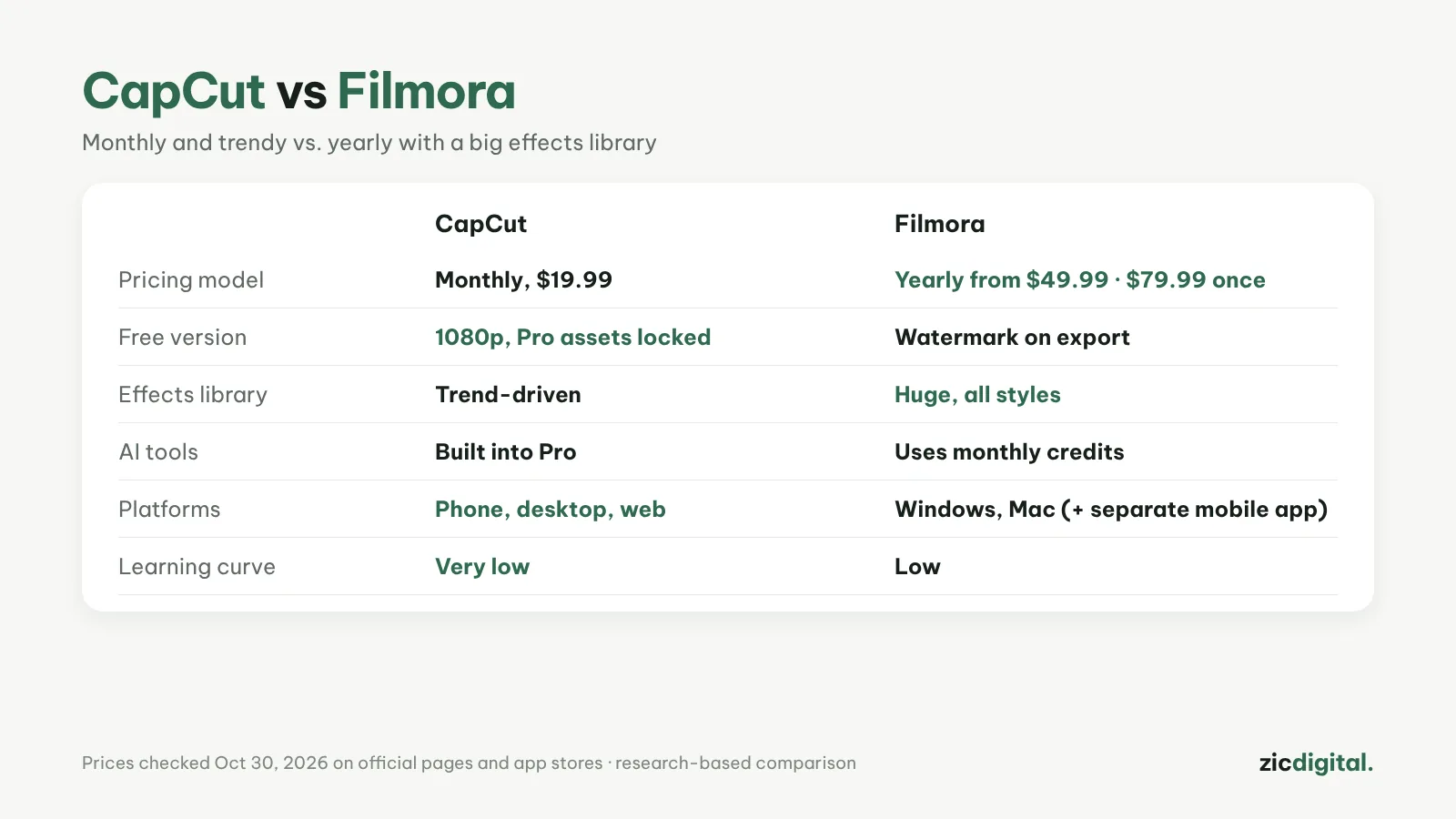
Both are easier to learn than DaVinci Resolve. The biggest differences are how you pay and what the free version gives you.
Choose CapCut if
- You want a free plan (1080p, mostly no watermark)
- You edit on both phone and computer
- You prefer paying monthly and stopping any time
Choose Filmora if
- You want a huge effects library for many video styles
- You prefer paying yearly or once
- You use lots of AI tools like subtitles and voice
Cost
CapCut Pro costs $19.99/month. Filmora on Windows starts around $49.99/year, or $79.99 one-time without future major upgrades; yearly plans auto-renew.
Verdict
For free or flexible monthly use, pick CapCut. If you edit a lot on a computer and want a low yearly cost, Filmora is worth a look. Read more: Filmora review · CapCut review · CapCut vs Clipchamp · 8 best CapCut alternatives · Best free video editors for Windows