Epidemic Sound vs Artlist 2026: Which Music Library for Your Channel?
by Taylor · Audio Desk — Taylor is a pen name used by a Zic Digital editor who runs the Audio Desk. About us
Epidemic Sound is cheaper when you need ads and client rights, and offers monthly billing; Artlist adds stock footage and templates on Max. Compare prices, licensing and which to choose.
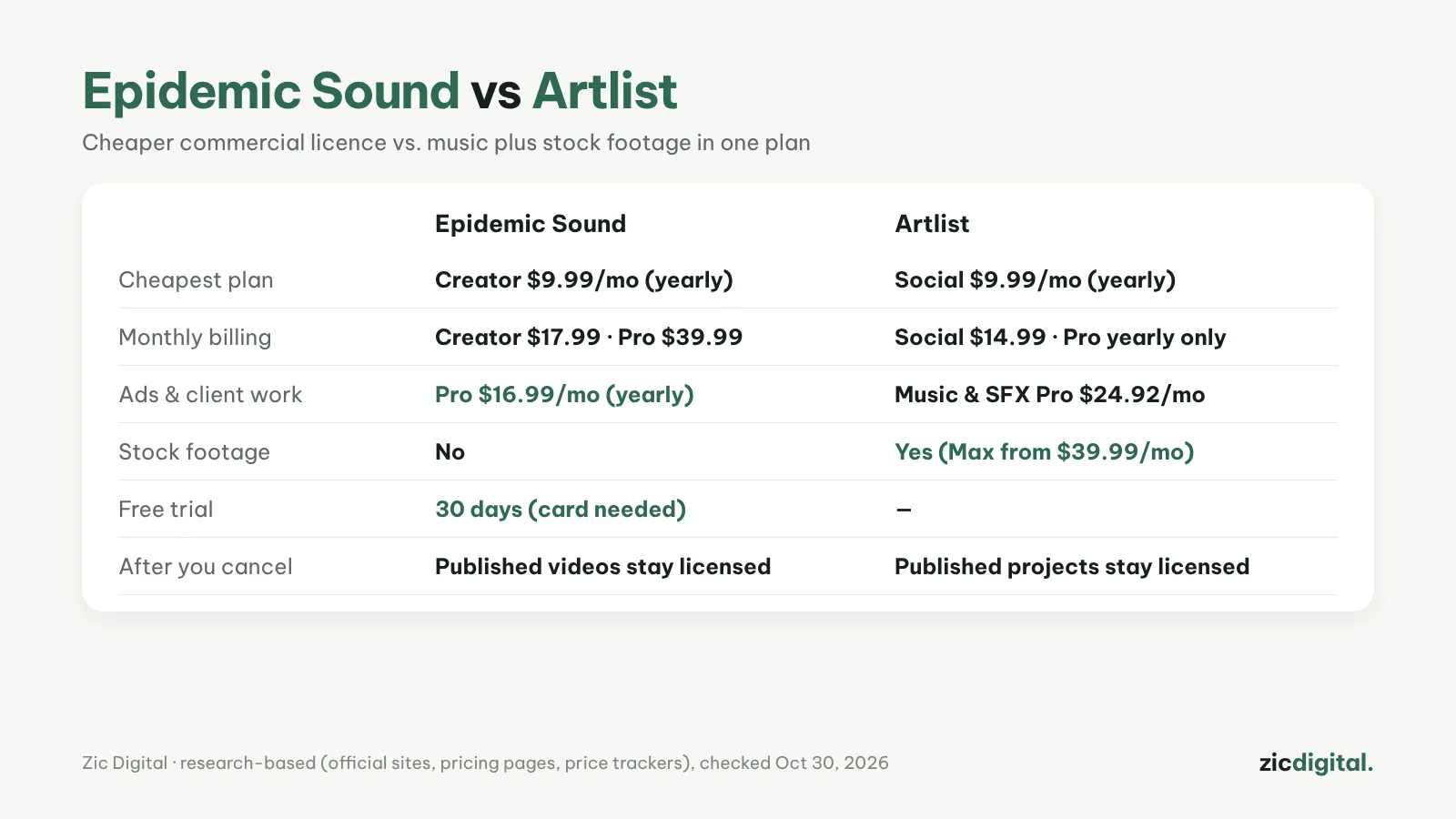
Both sell music and sound effects by subscription, safe for YouTube while you're subscribed. The cheapest plans cost almost the same ($9.99/month billed yearly); the differences are commercial pricing, billing options and whether you need stock footage.
Choose Epidemic Sound if
- You run ads or do client work and want a cheaper plan (Pro $16.99/month yearly)
- You want monthly billing, even for commercial use
- You want a 30-day trial before paying
Choose Artlist if
- You want cinematic music for travel vlogs and product films
- You also need stock footage and templates (Max)
- You can pay yearly and only run a personal channel (Social)
Cost
According to price trackers (July–September 2026, US prices): Epidemic Creator is $9.99/month billed yearly ($17.99 monthly), Pro $16.99/month yearly ($39.99 monthly). Artlist Social is $9.99/month yearly ($14.99 monthly), Music & SFX Pro $24.92/month yearly only, Max from $39.99/month.
Quick comparison
- Catalog: Epidemic Sound has 55,000+ tracks it owns exclusively and 250,000+ sound effects. Artlist counts 700,000+ assets: music, sound effects, stock footage, templates, color LUTs and plugins.
- Licenses: Epidemic Creator covers 1 channel per platform with no ads; Pro covers 3 channels, ads and client work. Artlist Social is for personal channels only; Pro covers client and commercial work.
- Billing: both Epidemic Sound plans can be paid monthly. Many Artlist plans are yearly only.
- Trial: Epidemic Sound has a 30-day trial (card required, renews automatically).
- Avoiding claims: with Epidemic Sound you connect your channels in account settings. With Artlist you add channels and videos to your Clearlist.
- Fitting music to a video: Epidemic's Adapt shortens or extends a track with a natural ending, and you can search by uploading a clip.
- Inside your editor: Epidemic has plugins for Premiere Pro and After Effects and an integration in DaVinci Resolve (Studio). Artlist's editing plugins come with the Business plan.
Which one for which channel
- Personal vlog, no paid ads: the entry plans cost the same billed yearly. Paying monthly, Artlist Social ($14.99) is cheaper than Epidemic Creator ($17.99).
- Sponsored videos, paid ads or client work: Epidemic Pro is $16.99/month billed yearly, or monthly if you prefer. Artlist Music & SFX Pro is about $24.92/month, yearly only.
- Travel films and product videos that also need footage: Artlist Max puts music, footage, templates and AI credits in one plan.
- TikToks with product links: Epidemic Sound lists the steps — Pro plan, a TikTok Business Account and the music-rights box when you upload.
Quick answers
I got a copyright claim. What now? With Epidemic Sound, check that the channel is connected, then send support the video link. With Artlist, a claim from "Artlist Ltd" almost always means the channel or video isn't on your Clearlist: dispute it on YouTube and add it.
Is there a free option? Neither has a permanent free plan; Epidemic Sound offers the 30-day trial. For $0, see music for YouTube without copyright claims.
Can I use AI music instead? You can, but check each tool's license first — see AI voice and music for YouTube.
Verdict
Just safe music, with ads or clients: Epidemic Sound. Great music plus stock footage in one plan: Artlist. With both, videos published while subscribed stay licensed, but you can't use old downloads in new videos after you cancel.
Comparison based on official sites, pricing pages and price trackers, checked October 30, 2026 — no affiliate links.
Read more: Epidemic Sound review · Artlist review · How to Make YouTube Shorts in CapCut, Step by Step · DaVinci Resolve Export Settings for YouTube (Free Version)
See also: AI Voice and Music for YouTube 2026: 6 Tools Worth Using