CapCut vs Descript 2026: Short Clips or Editing Video by Text?
CapCut suits short, effect-heavy clips; Descript suits podcasts and talking-head videos thanks to transcript-based editing.
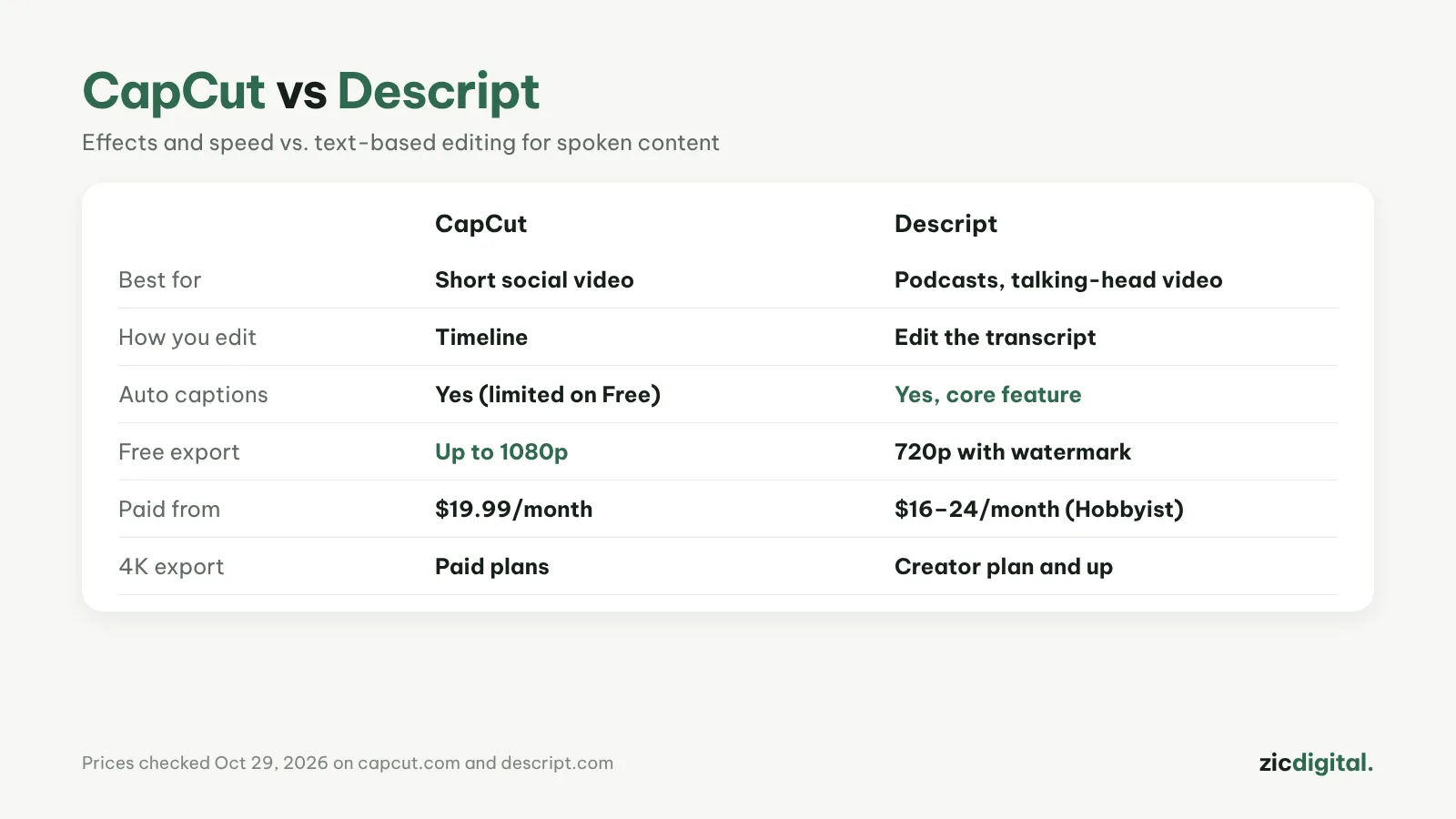
The biggest difference
CapCut is a timeline editor packed with effects and templates. Descript turns speech into text: delete the words and that part of the video is cut.
Choose CapCut if
- You make short clips for TikTok, Reels or Shorts
- You need effects, transitions and trendy templates
- You want free 1080p exports
Choose Descript if
- You make podcasts, interviews or talk-heavy tutorials
- You want filler words removed and voices cleaned up automatically
- You want captions and show notes generated from the transcript
Cost
CapCut Pro costs $19.99/month. Descript Hobbyist costs $16–24/month depending on yearly or monthly billing; the free plan exports 720p with a watermark. Descript charges by media minutes and AI credits, so long videos use them up fast.
Verdict
You can use both: edit the long version in Descript and cut short clips in CapCut. Read more: CapCut review · Descript review